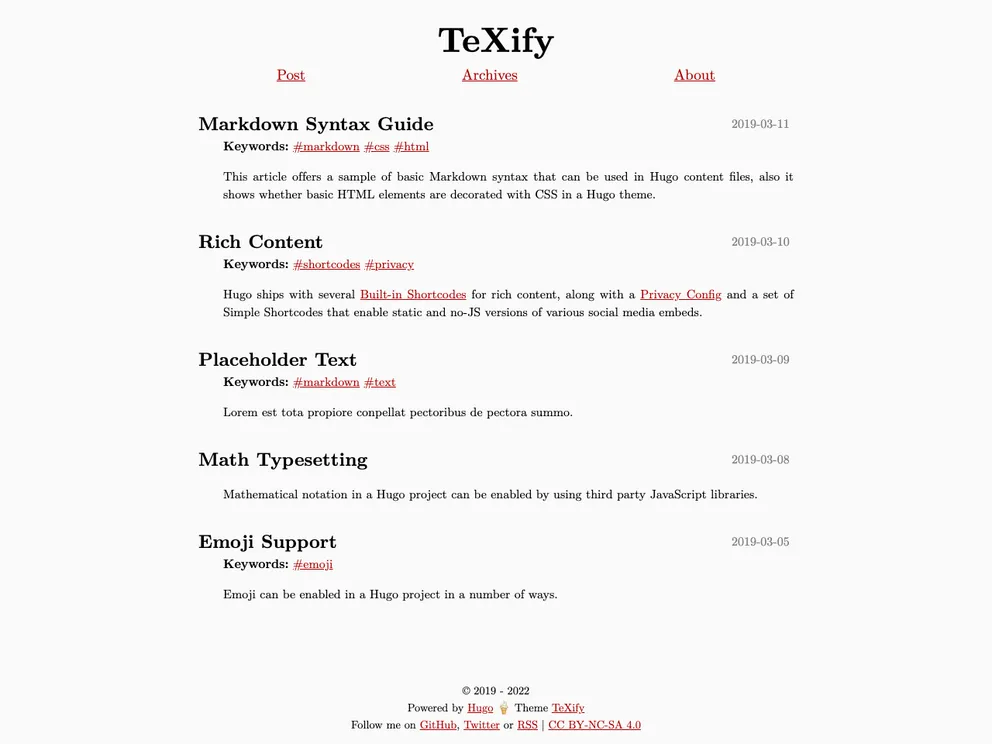
A minimal, latex-style hugo theme for personal blogging
TeXify is a minimalist Hugo theme designed for personal blogging that mimics the style of LaTeX. It is a responsive theme that includes features such as Disqus and Google Analytics integration, customizable stylesheets, and support for math equations using KaTeX or MathJax. With minimal CSS and no JavaScript, the theme is designed for optimal speed and performance.
To install TeXify, follow these steps:
git clone https://github.com/username/TeXify.git themes/TeXify
Replace username with your GitHub username.
config.toml file in your site’s root directory and set the theme parameter to TeXify.theme = "TeXify"
config.toml file according to your preferences.hugo server
You can now view your site with the TeXify theme applied by navigating to http://localhost:1313 in your web browser.
For Chinese users, it is recommended to use the Noto Serif SC font via Google Fonts. To do this, add the following code to your static/css/custom.css file:
@import url('https://fonts.googleapis.com/css?family=Noto+Serif+SC&display=swap');
TeVify is a minimalist Hugo theme that emulates the style of LaTeX for personal blogging. It includes features like Disqus comments, Google Analytics integration, and support for math equations. The theme is highly customizable and prioritizes speed and performance by minimizing CSS and JavaScript. For an enhanced experience, Chinese users are recommended to use the Noto Serif SC font via Google Fonts.

