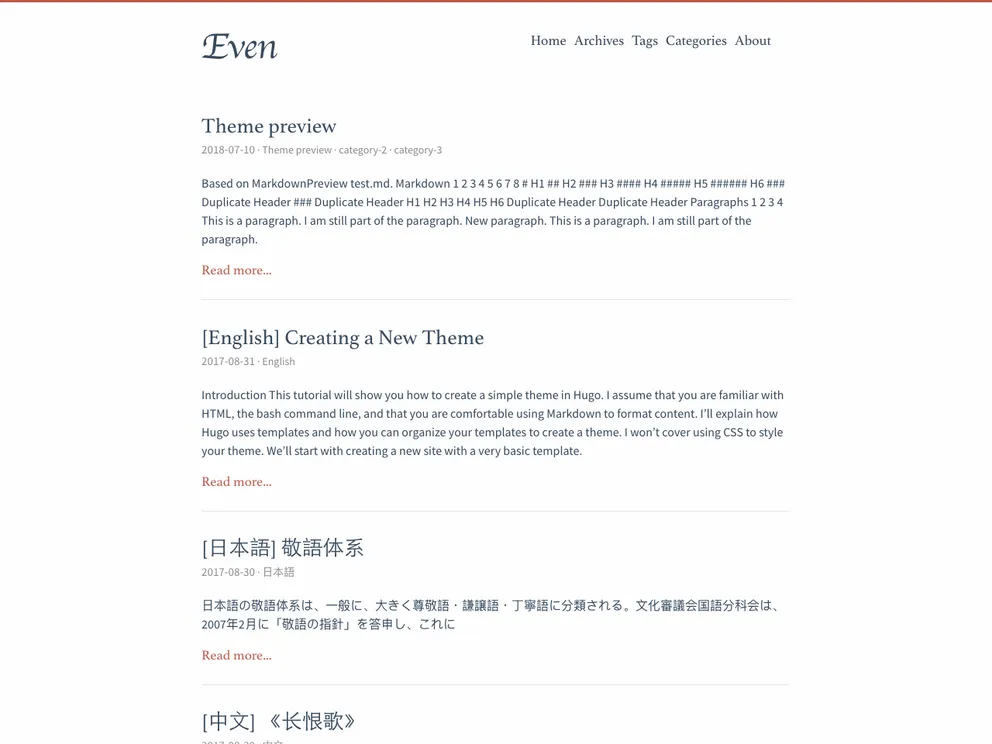
Overview:
Hugo-theme-even is a super concise theme for Hugo, a static site generator. It is a port of the hexo-theme-even and offers a minimalist and sleek design. The theme supports multiple languages and includes various features, such as a language selector, customizable favicon, and support for shortcodes.
Features:
- Installation: The theme provides a simple installation process. Users need to copy the config.toml file from the exampleSite folder into the root folder of their Hugo site. They also need to ensure that they have the extended version of Hugo installed if they want to modify contents in assets.
- Language Support: The theme supports multiple languages. Translations are collected from the themes/even/i18n folder and translations in the i18n folder at the root of the user’s project. Users can easily add support for additional languages.
- Language Selector: The theme includes an option to enable a language selector for multilingual sites. The language selector can be displayed in the header or in the slide menu, and users can enable it by setting the showLanguageSelector parameter to true.
- Favicon Customization: Users can easily customize the favicon for their site by placing the required files in the static folder at the root of their site. These files will overwrite the default files provided by the theme.
- Front Matter Customization: Users have the ability to customize specific content items by adding parameters in the content’s front-matter. The themes/even/archetypes/default.md file provides an example of the available parameters.
- Shortcodes: The theme offers various shortcodes, including center, right, left, music, and admonition. It also supports center, right, and left classes for the built-in figure.
- Theme Color Configuration: The theme provides five built-in theme colors, including Default, Mint Green, Cobalt Blue, Hot Pink, and Dark Violet. Users can customize the theme color by changing the $theme-color-config value in the _variable.scss file located in the /assets/sass/ directory.
- Update Theme: Users are advised to regularly check the CHANGELOG.md file whenever they update the theme, as there may be some breaking changes that require attention.
- License: The theme is released under the MIT License.
Installation:
To install the Hugo-theme-even theme, follow these steps:
- Go to the theme’s GitHub repository and download the zip file.
- Unzip the downloaded file.
- Inside the unzipped folder, navigate to the exampleSite folder.
- Copy the config.toml file from the exampleSite folder.
- Paste the config.toml file into the root folder of your Hugo site.
- Make any necessary changes to the config.toml file.
- Ensure that you have the extended version of Hugo installed if you want to modify contents in the assets folder.
- Your installation is now complete. Customization and further configuration can be done according to your requirements.
Summary:
Hugo-theme-even is a minimalist and sleek theme for Hugo, offering a clean and modern design. With its support for multiple languages, customizable favicon, and various customization options such as front matter and shortcodes, the theme provides flexibility for users to create their desired website. The installation process is straightforward, and users are recommended to check for any breaking changes when updating the theme. Overall, Hugo-theme-even is a versatile and user-friendly theme for creating Hugo websites.