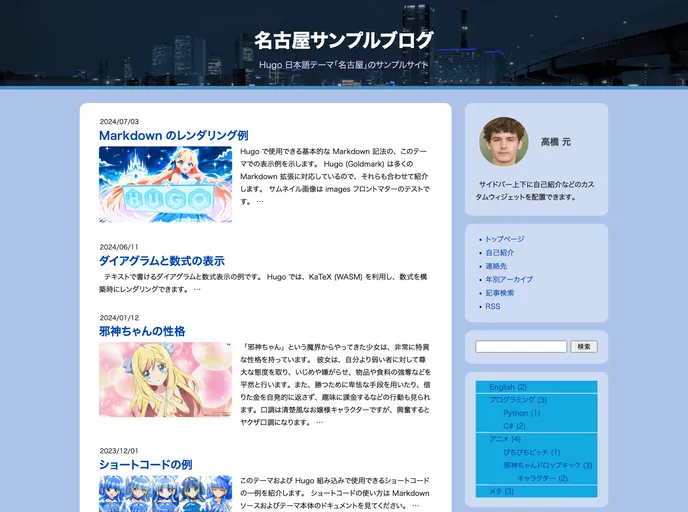
レスポンシブ対応、日本語特化 Hugo ブログテーマ
Nagoya is a Japanese theme for the static site generator Hugo. It is designed and optimized for Japanese users and does not support internationalization (i18n). You can find a demo site at https://curegit.github.io/nagoya-example/ and the source code for the demo site at https://github.com/curegit/nagoya-example.
images value, that image will be used as the thumbnail. Otherwise, any image in the folder with “feature”, “cover”, or “thumbnail” in the filename will be used.archives parameter in each post.hugo.toml file. These parameters include the site’s author, description, keywords, whether to show the last modified date of each post, the starting point of the sidebar section navigation, the number of latest posts to show in the sidebar, the number of related posts to show at the bottom of each post, the number of random posts to show at the bottom of each post, and whether to shuffle the order of related and random posts.To install the Nagoya theme for Hugo, follow these steps:
git submodule add https://github.com/curegit/nagoya.git themes/nagoya
config.toml or config.yaml) and add the following line to set the theme:theme = "nagoya"
Nagoya is a Japanese theme for the Hugo static site generator. It is designed for Japanese users and offers features such as customizable thumbnails, special treatment of tags and archives, and site-wide configuration parameters. Installing the theme is easy using the provided installation instructions, and customization can be done by modifying the theme-specific options in the Hugo site’s configuration file. Overall, Nagoya is a well-optimized theme that caters to the needs of Japanese users.

